Showing posts with label tip. Show all posts

January 1, 2019

5 Tips to get over Artistic Block 2019

If the Holidays, the weather... or whatever else is leaving you feeling blocked, you can do a few things to stop the block. HERE is a list of 5 tips:

 
Do you have your own method to push you through a block? Let me know in the comments! 

And Happy New year!


♥ To see details about a new awesome 2019 one-full-year lessons visit this link: https://bit.ly/2SSXxrS


Check my available art and online classes get my newsletter

August 11, 2016

Art Hack for your palette

I made this quick video with a super easy DIY art tip:


https://youtu.be/b7YYA9fmzgw

And I made a link to a playlist with more art hacks. It will be growing as I make more videos and add them to the list ;o)
 I forgot to mention, I am working on a smaller space now, we packed up my art room, we are moving!  /(͡๏_๏)\

Check my available art and online classes get my newsletter

April 21, 2016

Acrylic paint comparison: student grade vs pro

When it comes to buy acrylic paint what is ok, better or worse?
Acrylic paint comparison: student grade vs pro. I am not getting exactly into brands, but into levels of paint.

I have my favorite brands but sometimes I try new stuff specially when they are on sale, but as you will see, it is not always a good deal :oP

https://youtu.be/XaHjW1kOKBU

Click the image or the link to watch video:
https://youtu.be/XaHjW1kOKBU


Check my available art and online classes get my newsletter

March 24, 2016

Making a drawing larger

This is how I make my drawings larger:

https://youtu.be/kQrhh4PL_VI

Thanks for visiting! Comments Questions? Just ask!
Click image or link for Video:
https://youtu.be/kQrhh4PL_VI


Check my available art and online classes get my newsletter

March 22, 2016

How to make the chin on a face, Art Journal Page

How to make the chin proportion on a face?
I made this aqua and blue page and painted a face for the 29 faces challenge, and as I mentioned before, there was going to be a video, here it is!
In this video I answer a question from a member of the group, refering to how to make the right size for the chin on a face.

https://youtu.be/3SDdiouf9uA

 Click on image of link to watch video:
https://youtu.be/3SDdiouf9uA

If you have any questions art related, feel free to ask! I will answer in a video.

Check my available art and online classes get my newsletter

March 8, 2016

How to carve a lino cut stamp: Seed pod design pattern

Hello there!
Here is a new video for those that want to carve their own stamps, I created this seed por drawing, you are welcome to download it and use it for your journal books, or even a painting to sell,  however it is not for distributing alone or with other patterns or for mass producing items. Also, a credit is always welcome when using another person's designs! ♥

Here is the video:

https://youtu.be/ahwaPbAvu1U

https://youtu.be/ahwaPbAvu1U

and here is the design, click to enlarge:


Don't forget to subscribe to my channel to get all the videos!
Check my available art and online classes get my newsletter

February 12, 2016

Drawing a profile face. Day 12 of 29 faces

Drawing a profile face. I rarelypaint of draw profiles but they are a lot of fun.
Tip: The thing we have to be careful here is to place the chin in the right place, so it is not sticking out, or sunken too deep.
I thought of adding some whimsical pink hair and she's done.


Check my available art and online classes get my newsletter

September 10, 2014

No.10 ... hair options


I have posted several times by now about how I make a print of my painting and test  a couple of things when I am not sure what direction to take.... particularly with hair.


So for today, I want to share that part of the process for my face No. 10 in the 29 faces.


I painted on wood (video coming soon!) and made a few different styles to look at and decide.

I love wind blown hair, it is so much fun to paint/draw ... but long "quiet" hair is sweet too. Which will it be?   ;o)


Check my available art and online classes get my newsletter

August 15, 2014

Are you getting my channel videos?

Tutorial: how to get YouTube videos from your subscriptions:

With all the changes YouTube made recently (and most likely will happen again), you probably noticed that you are not getting the videos anymore.
I made this tutorial so you get notifications on your inbox again.

UPDATE 2015/2016:
To receive a notification of every time I upload a video in my channel click the option in the little menu:
*At this point I am posting weekly on Tuesdays, and very often on Thursdays. When I am in a video challenge I post some odd day as well.


Old post continues...

January 9, 2014

Accidentally deleted Google Page in Youtube

This is a tutorial on how to recover the Google page attached to the YouTube channel.

Google has been making users have a page, but they have a glitch where when the user declines, and later another window pops to accept to get a page again, it makes a new google page for the same channel. It is very common to have 4 or 5 pages with the same name, unknowingly.

Then of course you have to see them in the menu now that you have to use the google page for the channel.

Well, there is a way to get rid of those pages, unfortunately, if you are not sure of what you are doing, you can end up deleting the one page attached to your channel and all it's contents (favorites, history, subscriptions and lists). That is a nightmare.

But, there is a way to recover, kind of hidden, that's why I am showing this tutorial, to help distribute the information and help recover the page and the youtube channel.

Here is the information:

How to delete extra Google pages in a youtube channel-
It has to be done very carefully, as it is really easy to delete the wrong thing!

It is very nicely explained, but the problem is that all those extra pages have the same name, making people accidentally delete the one page that contains all the settings and lists for the channel admin. I did that myself and was so frustrated!


If you delete the wrong page, there's still a chance. It has to be done as soon as possible preferably within the first 12 hours so it doesn't get completely deleted from their servers. At that point, it will not be recoverable.
Click image to enlarge.


Here is how to recover the page: Follow the link and select "I don't know my password". Yes, sounds tricky, but it worked for me. You will need your user name and or the email you use for the youtube channel:

https://www.google.com/accounts/recovery

 If things go right, you should end in the google page asking you for extra information for safety. You decide what information you give.
If you get an error page saying "This account was deleted and is no longer recoverable" then you lost all your information.

At that point, you can see if you still have the videos and restart a new channel.

For any other youtube help, follow this link: (it might change URL overtime. It took me hours to find a way to save my own accidentally deleted G page, following many broken links)

http://productforums.google.com/forum/#!forum/youtube

I hope it helps. I know it is very shocking and frustrating to have that happen. Please share this post, hopefully it will save someone from fainting.


November 9, 2013

Overhaul it. Online Art class, workshop

learn to paint. Painting tutorial. online art workshops. art painting e-class 
I am so happy to show you this short video of my new Online Art Class! There are four paintings and many tips, ideas and instructions! Perfect artsy present for yourself of your loved one! ♥


What exactly is it?
An online class based on videos. Four awesome projects divided in (14) sections where you learn about making portraits based on texture, techniques and my tips on painting.

This class if for those that can manage drawing a face but want to learn more.
*If you have never done a face I have another class HERE "Basic Face"

You will receive an invitation to join the class-space after your payment.

How long is it?
You can watch them at your own pace. It depends on you. It can take a few weeks, or a few evenings... or one solid marathon day of art. You can watch the videos as much as you want and paint along. If you have any questions, just post them here or email me (from my menu button up here)

What do I need to take the class? 
- A Google ID (what you use for blogging, or youtube etc)
- A fast internet connection and sufficient knowledge to join internet sites. Plus a recent browser version.
A fast internet connection for the HD videos.
A google ID (just like what you use to comment in my blog)
Sufficient basic computer knowledge to join online services .
To get a free flickr account. (Optional)
A digital camera or scanner to show me your work.
Watercolor/Bristol Paper, pencil, eraser. watercolor pencils or acrylic paints. - See more at: http://ilove2paint.blogspot.com/2012/05/officially-official-workshop-posthello.html
A fast internet connection for the HD videos.
A google ID (just like what you use to comment in my blog)
Sufficient basic computer knowledge to join online services .
To get a free flickr account. (Optional)
A digital camera or scanner to show me your work.
Watercolor/Bristol Paper, pencil, eraser. watercolor pencils or acrylic paints. - See more at: http://ilove2paint.blogspot.com/2012/05/officially-official-workshop-posthello.html#sthash.fwInKuRv.dpuf
A fast internet connection for the HD videos.
A google ID (just like what you use to comment in my blog)
Sufficient basic computer knowledge to join online services .
To get a free flickr account. (Optional)
A digital camera or scanner to show me your work.
Watercolor/Bristol Paper, pencil, eraser. watercolor pencils or acrylic paints. - See more at: http://ilove2paint.blogspot.com/2012/05/officially-official-workshop-posthello.html#sthash.fwInKuRv.dpuf
- Your rejected piece(s) of art. OR you can start with a blank surface, no problem!
- Acrylic  paints, paper, canvas, and your stash of mixed media items. A complete list will be given after joining. You can start from a blank page as well.


How much is it? How do I get in?
Only $45.00 US dollars for 4 projects and hours of useful tips and info! Price might go up in the future. Buy now button below.

Because of the nature of online classes, no refunds allowed once you join the class.
After paying with paypal, please email me (top button in this blog) to let me know you purchased the class! 
If you are visiting this Blog from a cell phone, you might have to click on "watch as a web page" option to see the top menu.

 ♥


To purchase: Click on BuyNow button.
 Email me  on the contact form (on side bar)  to let me know you purchased the class.
Sometimes paypal takes a while to send me a note.
And check your junk/spam folder in case my email lands there!


Find Testimonials at the end of this page  HERE

September 12, 2013

Blog problems

For those in blogger/blogspot you probably noticed they had some issues showing a little yellow window saying :

"You have logged out from another location. Do you want to log in again?
Yes, I want to log in again."   


And it has been stuck on that, even if you log or re-log and clear cache etc...
Scary, annoying, frustrating....

TIP: The only thing that worked for me (after trying other browsers, deleting cookies, closing, restarting, etc) was to go directly to their homepage

 https://www.blogger.com  

and sign in from there.That worked for me.
If you don't know what I'm talking about, you are lucky! :oD

They are having the problem, it is not on your end (or mine, for that matter!) Seems like while changing programs or updating stuff, it's been months of this going on to some users... then another group of users, chances are, it will affect all eventually.
So if it happens to you, just keep this post as a reference.


~♥~

August 2, 2013

Is your blogger profile gone?

Many have noticed that their blogger profile is gone after they joined Google+. Some of us got out, but some people like it here an wish they could still have their old profile like before.
Well, guess what? It can be done!
You have to go to your dashboard, and see the top right icon like a tool gear? Click on it and it will give you a menu. From there select "Revert to Blogger Profile".
The it will tell you if you do it, you will remove the "About to" in Google+.
If you really enjoy the site, leave it as that. If you don't care because the "limited" blogger profile suits you better.... then click to switch.


That will make it just as it was before, and still be in the G+ network.
I personally did not like either, but I also understand many people do like it. Many want to enjoy both worlds and this, I think, is a happy compromise :o)

If you want to go one step further, you can then click "Edit profile" and add your email, so people can email you directly. But that is up to each person, I do not have it showing in my profile.

Check my available art and online classes get my newsletter

July 29, 2013

Saying good bye to the overbearing black bar

Some of you know already that I never really liked the Gogle+, particularly the uninvited overbearing black bar on top.


With almost 3 million people agreeing I was not alone. (see the results number?)
I'm not sure how anyone could think that having that bar all over the sites, could make people happy. Yes, it uniformed their sites, but I do not want it in my browser thank you very much.

I tried to find out as much as possible about the results of leaving G+. I was so upset to learn that once in, it was like Hotel California.... "you can never leave". ლ(ಠ_ಠლ)
It said at the time, that once in, if you deleted the account, you would lose ALL associated sites and services. Imagine my delight. My blog! My youtube channel... flickr, iGoogle, photo albums, Followers... etc etc etc. That was a scary thought, if only virtual in value.

I guess they were bombarded by many postings because they changed the settings from "no can do" into "we will attempt to set things the way they were" so I changed my email for the blog just in case. I had not changed my profile to the "new google profile" mostly because by then I was mad at google+, and that was a good thing, because it is more difficult when you have the accounts joined with it!
So basically, undo the joining of accounts, (like in youtube for example), change momentarily the email to your blog (a pain, I know, but it helps), then go to the Google Account Management, settings, and from there select either  to delete just the plus, or the entire thing. In my case, it was just  the G+, and only after I insured it was not going to drag my blog into the mix.
My "Profile widget" was gone until I removed the other new email, and I added my old one back, then everything went back to normal.

Now my browser  is back to normal, with no black bar on top everywhere I go. I'm very happy. Ù©(◠◡◠)Û¶  Maybe in the future they will do some new thing I'd like to use, at  this point their social networking site did not feel private to me, was too repetitive, like when you get a FWD repeatedly and has all those little extra lines... ugh!

I recommend to try out any site, but with an email that you won't care if they get nuts on your account, just in case (•‿-)


July 5, 2013

Photos and editing

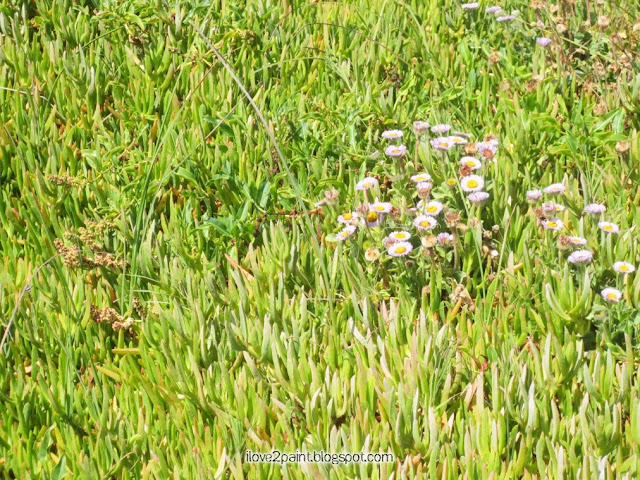
This photos are part of the "Show me yours" month, but also, a little tip on editing digitally an image. We have all kinds of desertic ground cover plants, also known as ice-plants. I personally think it is false advetisment, since there's no ice involved lol

As you can see, the first picture shows a ground covering plant. In person looks awesome, but in my captured photo, looks kind of blah, because the light was not right.


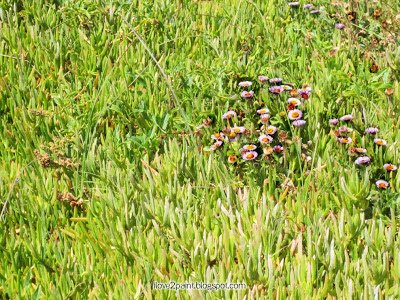
So, I played a bit with my editor, it has a "brush selector" and darkened just the area of the cute little purple flowers that were almost invisible in the first sample:


It is just a simple thing, but that's the tip. We don't need too add much to an image some times :o)

Thanks to all the awesome places you are posting people!! I love them all! ♥
Visit the "Show me" tab in my menu to visit beautiful lands and awesome people ;o)

Have a good weekend!

May 26, 2013

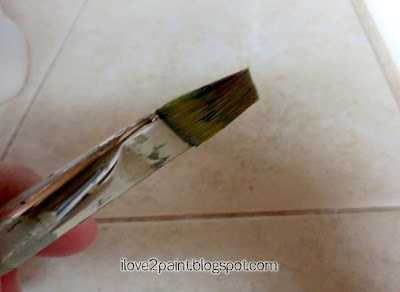
Save a dead paint brush!

Have you ever had a busy painting day, too many things in your head that you forget completely to clean your favorite painting brush...? just to discovered it all ruined and stiff the next morning (aaaghhh!!)
Well, here is a tip to save a damaged paint brush from the trash can!

Acrylic paint or medium can make the bristles hard and ruin a good brush.

More images after the post brake....

November 30, 2012

Blog image storage?

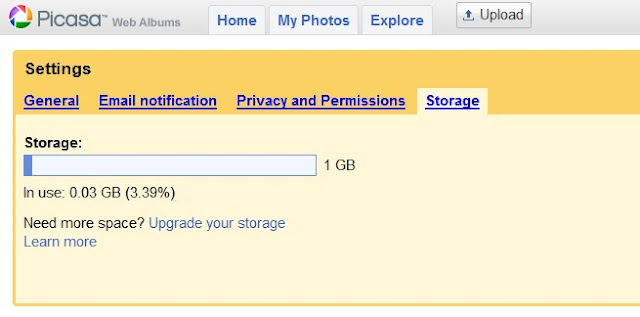
Hey guys, I recently heard that picasa/blogspot have a limit on their storage, and after you run out of space you have to pay. Some people have ran out of space, but they are recent bloggers, and I have been here for 7 years and still have not run into that problem.


See how little room I have used in 7 years of posting? and I always include images.
That got me thinking.... It has to be the size of the image, not the amount of pictures.

Sure enough, after a little bit of searching, I came across an article that pretty much says that: if you keep your images small or with less resolution, like in 70s or 80s size, you are in the safe side.

That is great news! Number one, for a faster downloading of your pages for your visitors, it is always a good idea to keep the images small, and also to try to keep the image-grabbers to get your work then use it somewhere else (which can happen anyway but it helps to keep low res.)

So this is a new reason why keep your images small. They recommend less than 800 pixels, I use about 400 most of the time. And my videos are embedded from youtube.

How much room do you have left? click HERE to see directly your own storage level.

If you see you are close to the limit, you can: go each post, check the image size, edit, re-upload, re-publish. Lots of work, but well worth it.
or, get a photobucket free membership, and bring the code to your post.

Let me know how much space you have! (◠‿◠)

Update:  About editing images....
Most computers come with Paint program, or you can download a version online of a photo editor, there are many for free but you have to try a couple to see which one you like best. Once you have a program --I personally love an OLD version of MS Photo Editor because it is very basic but does all I need. Lets say we do "Paint" for now: you open your image there, and look in the menu for "Resize" and/or "Crop".
If you have too much empty space in the image, crop it out with that tool.

If you have a nice composition or don't want to crop anything, just go to Resize and select a percentage. Most of the time you do around 50% but sometimes it can be more, depending on your camera settings. The more quality the image, the larger it will be in the computer. In some programs you can go to "Properties" and make the image have less "Resolution" which will make it even lighter to upload, store and download, which makes for a faster page to open. A light Resolution is around 70 to 80. But if you are into giving photography to readers, or backgrounds, you will need a huge resolution for better quality!

Once you are done with the editing, always do "Save as" and not just "Save" so you keep the original as well.

Then just go back to the old posts, change the images for the lighter version, and make sure you delete the larger images from the Picasa  files. Ta-daa!
 

Check my available art and online classes get my newsletter

October 16, 2012

We have 2 winners!

Here is the video of the "almost 600 giveaway" I didn't want to post without a video, and the site was too slow, I had to start again today. All is good.
Thank you ALL for participating, for visiting, for making my little blog a place I love.
I really hope you find something inspiring that will inspire you to create and have fun.

Maybe it is a good time to suggest ways of searching in the blog (and make you wait a bit more for the winners result... hehehe)

tip: I have buttons to click on the top menu, there's also random older posts on the left side bar, and there is the label cloud, also on the side bar, with a bunch of tags and labels you can click to see all the older postings.

And now... Ta Daaaa... the video!


Thanks for visiting! ♥

October 14, 2012

FaceBook note, and art

For some of those in facebook, you probably noticed a new little link that invites you to promote. Not everyone is seeing it yet, but I'm sure it is a matter of time.
When it is a business page, well, that might be ok, but for a personal page? I don't think it is right, specially when they will charge you about 6.00 dollars just to let your own readers see your post. More about it HERE
In any case, if you want to keep seeing my FB page, do the following:

To keep on RECEIVING POSTS you have to OPEN THE PAGE, hover the mo
use on the "Like" button near the gear symbol. In the pop-up select "ADD TO THE INTEREST LISTS".

So, "Like" the pages you want, then do step 1 and 2.


 Doing so will assure that you continue getting posts from ALL pages you love. Hopefully I will be on your list  (
☆◠‿◠☆)

Now, the art part of this post: These are the sample hair I made, to see what I'd like best for this particular page. I'm going with the pink so far.


 Thanks for visiting!
 

August 9, 2012

Been busy

I'm editing videos, and helping DH with an overload of work, so I have been busy with busy stuff, no time to paint for the next few days, but I'm sketching ideas, don't want my muse to think I'm not paying attention :oP

Notes to remember:

*7th anniversary giveaway HERE  (post about it/share it, get a gift!) There are ACEO cards, a Frida Kahlo mini painting, paperdoll... 7 gifts!

* September is around the corner (What??) get ready for 29 faces!

* Want to email me? I added a button, top right.

* A new Online art class coming up soon! yaay! (Limited number registration)


And last but not least, here is one of my recent videos:


Click on the youtube logo to go to my channel for Part 1 an Part 3. With many tips. Subscribe to see more videos as I upload them. Not all of them get posted to my blog!


Thanks for visiting ♥